
Brookvent Aircycle 1.2/1.3/1.3+ Filter Cover Set (AS 90-09-908)
These replacement covers are the front cover tabs that protect your MVHR filters.
Product Code: (AS 90-09-908)


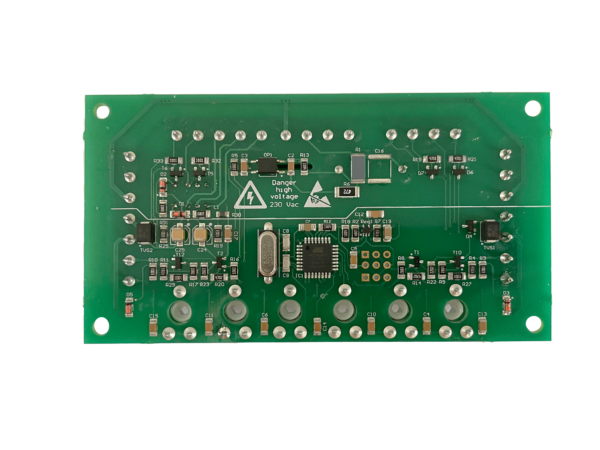

In the unlikely event of an electronic PCB failure, the Aircycle 3.1’s PCB module can be easily disconnected and replaced. Product Code: AS 90-09-801
Step By Step Process:
Step 1. Isolate the unit from the mains and ensure all supply circuits are disconnected.
Step 2. Disconnect the mains from the fused spur.
Step 2. Unscrew the two large screws in the front of the control panel and pull out the PCB assembly.
Step 3. Unplug all the leads, the connectors are all marked to match up with their corresponding internal connections.
Step 4. Feed the mains cable from the replacement assembly through the unit and out the through the hole in the back plate.
Step 5. Connect all the cables back up ensuring to connect each cable to the correctly marked connector.
Step 6. Replace the assembly in the pocket and secure in place with the screws.
Step 7. Connect the mains to the fused spur.
Step 8. Power the unit on at the isolator and ensure any supply circuits are reconnected. The unit will need to be re-commissioned.
€133.00 + VAT
![1.2-Front-Filter-Cover-Set-2-600×227[1]](https://brookvent.ie/wp-content/uploads/2023/03/1.2-Front-Filter-Cover-Set-2-600x2271-1.png "1.2-Front-Filter-Cover-Set-2-600×227[1]")
Brookvent Aircycle 1.2/1.3/1.3+ Filter Cover Set (AS 90-09-908)
These replacement covers are the front cover tabs that protect your MVHR filters.
Product Code: (AS 90-09-908)
![31-600×616[1]](https://brookvent.ie/wp-content/uploads/2022/06/31-600x6161-1.png "31-600×616[1]")
Brookvent Aircycle 3.1/4.1 Front Panel Kit
Product Code: AS 90-09-810
Please indicate in the order notes which version you need (e.g. 3.1 or 4.1)
![1.2-PCB-Front-600×450[1]](https://brookvent.ie/wp-content/uploads/2022/06/1.2-PCB-Front-600x4501-1.png "1.2-PCB-Front-600×450[1]")
Brookvent Aircycle 1.2/1.3/1.3+ Dial operated PCB kit.
In the unlikely event of an electronic PCB failure, the Aircycle 1.3’s PCB module can be disconnected and replaced.
Step 1. PCB replacement should only be completed by a qualified Electrician.
Step 2. Ensure all circuits are isolated before working on the unit.
Step 3. When handling the PCB’s ensure the devices are grounded to prevent electrostatic discharge from damaging the components.
Step 4. To locate the PCB in the correct position; line the feet A & B on the PCB along the edge of the enclosure as shown.
Step 5. Also line the edge of foot A shown against the yellow stand-off in the enclosure.
Step 6. This will ensure that the spindles line up with the holes in the enclosure lid.
Step 7. For inverted units (white label) line foot A up with the opposite edge and with the yellow stand off on the bottom right (i.e. the same position as the one being replaced).
Step 8. Wire the PCB as shown on the other page (note there are two sensors wired in the interface terminal, the unit may not work if only one is wired).
Step 9. When the unit is wired and fixed in place; insert the spindles in the potentiometers.
Step 10. To do this ensure all the potentiometers are turned fully anti-clockwise.
Step 11. Insert the spindles with the slot in the direction shown.
Step 12. Replace the cover and screw it in place.
Step 13. Re-connect the power.
Step 14. Recommission the system.
If you have any questions regarding this procedure, please get in contact with the office on 02890616505 or hello@brookvent.co.uk
https://brookvent.co.uk/product/aircycle-1-3-house-ventilation-system/